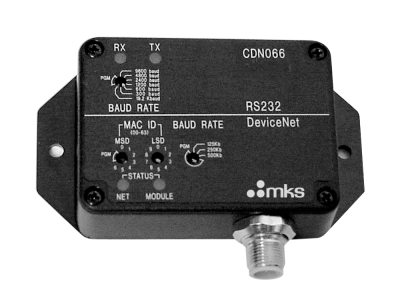
ToolLink™ DeviceNet™ to RS232 Gateways
Model: toollink-devicenet-to-rs232-gateways
ToolLink™ DeviceNet™ to RS232 Gateways
Model: toollink-devicenet-to-rs232-gateways
Technical Specs
Type
DeviceNet™ to RS232 Gateways
DeviceNet Connector
5-pin male microconnector
DeviceNet Data Format
Software selectable data word formats [high/low byte] or [low/high byte]
Power Requirements
11-28VDC, 200mA max.
DeviceNet Data Rates
125K, 250K, 500K bits-per-second Rotary switch or software selectable
DeviceNet I/O Messaging
Polled
Interface Mode
DeviceNet Group 2 Only Slave
CAN Signal Levels
ISO 11898
DeviceNet Output Message Size
4 to 68 bytes (4 overhead, 0 to 64 Tx Message data), software selectable
Loss of Ground
Full Protection Circuitry
MAC ID
0 to 63 Rotary switch or software selectable
Reverse Polarity
-30 VDC max.
RS232 Data Rates
300, 600, 1200, 2400, 4800, 9600, 19200 bits-per-second Rotary switch or software selectable Parity Even, Odd, None. Software selectable. Automatic parity strip.
RS232 Data Bits
8 data bits with no parity, 7 data bits with parity
RS232 Isolation
500V, between RS232 and DeviceNet interfaces
RS232 ESD Protection
±10 kV
RS232 Overload Protection
±30 V
RS232 Handshake
Optional Rx Message handshake to control data transfer rates over DeviceNet
RS232 Output Signal Levels
±7.9 V (typical)
RS232 Connector
DB9 male
RS232 Short Circuit
Indefinite
RS232 Rx Buffer Size
128 bytes
RS232 Tx Buffer Size
128 bytes
RS232 Flow Control
RTS/CTS, xON/xOFF, None Software selectable
RS232 Rx Message Framing
Software selectable framing options - Time Out: Inter-byte delay fixed at 4 byte-times Fixed Length: 0 to 64 byte message lengths Start/Stop Delimiters: 0 to 4 byte start-string and 0 to 4 byte stop-string
DeviceNet Input Message Format
STS:
Status Byte
Bit 7 = Rx Buffer Empty
Bit 6 = Rx Buffer Overflow
Bit 5 = Rx Parity Error (automatically resets with new Rx message)
Bit 4 = Tx Buffer Empty
Bit 3 = Tx Buffer Overflow
RxC:
Receive Message Counter. Gateway increments RxC when new Rx Message is in Data field.
TxA:
Transmit Message Acknowledge. Gateway sets TxA equal to TxC after Tx Message is transmitted.
LENGTH:
Number of valid Rx Message bytes in the Data field.
DATA:
Fixed length field (0-64 bytes). Contains Rx Message bytes (left justified). Unused bytes are set to 0x00.
DeviceNet Output Message Format
CMD:
Command Byte
Bit 6 = Clear Rx Buffer (set bit to clear overflow error)
Bit 3 = Clear Tx Buffer (set bit to clear overflow error)
RxA:
Receive Message Acknowledge. Optional Rx handshake byte. Application sets RxA equal to RxC after processing last received message.
TxC:
Transmit Message Counter. Application increments TxC when new Tx Message is in Data field.
LENGTH:
Number of valid Tx Message bytes in Data field.
DATA:
Field length field (0-64 bytes). Contains Tx Message bytes (left justified).
DeviceNet Input Message Size
4 to 68 bytes (4 overhead, 0 to 64 Rx Message data), software selectable
Dimensions
3.25 x 2.37 x 1.08 inches (82.6 x 60.2 x 27.4 mm) 0.5 inch (12.7 mm) mounting tabs
Mounting Holes
0.1875 inch (4.76 mm) diameter
Operating Temperature
0 to 70°C
Storage Temperature
-40 to 85°C
Technical Specs
Type
DeviceNet™ to RS232 Gateways
DeviceNet Connector
5-pin male microconnector
DeviceNet Data Format
Software selectable data word formats [high/low byte] or [low/high byte]
Power Requirements
11-28VDC, 200mA max.
DeviceNet Data Rates
125K, 250K, 500K bits-per-second Rotary switch or software selectable
DeviceNet I/O Messaging
Polled
Interface Mode
DeviceNet Group 2 Only Slave
CAN Signal Levels
ISO 11898
DeviceNet Output Message Size
4 to 68 bytes (4 overhead, 0 to 64 Tx Message data), software selectable
Loss of Ground
Full Protection Circuitry
MAC ID
0 to 63 Rotary switch or software selectable
Reverse Polarity
-30 VDC max.
RS232 Data Rates
300, 600, 1200, 2400, 4800, 9600, 19200 bits-per-second Rotary switch or software selectable Parity Even, Odd, None. Software selectable. Automatic parity strip.
RS232 Data Bits
8 data bits with no parity, 7 data bits with parity
RS232 Isolation
500V, between RS232 and DeviceNet interfaces
RS232 ESD Protection
±10 kV
RS232 Overload Protection
±30 V
RS232 Handshake
Optional Rx Message handshake to control data transfer rates over DeviceNet
RS232 Output Signal Levels
±7.9 V (typical)
RS232 Connector
DB9 male
RS232 Short Circuit
Indefinite
RS232 Rx Buffer Size
128 bytes
RS232 Tx Buffer Size
128 bytes
RS232 Flow Control
RTS/CTS, xON/xOFF, None Software selectable
RS232 Rx Message Framing
Software selectable framing options - Time Out: Inter-byte delay fixed at 4 byte-times Fixed Length: 0 to 64 byte message lengths Start/Stop Delimiters: 0 to 4 byte start-string and 0 to 4 byte stop-string
DeviceNet Input Message Format
STS:
Status Byte
Bit 7 = Rx Buffer Empty
Bit 6 = Rx Buffer Overflow
Bit 5 = Rx Parity Error (automatically resets with new Rx message)
Bit 4 = Tx Buffer Empty
Bit 3 = Tx Buffer Overflow
RxC:
Receive Message Counter. Gateway increments RxC when new Rx Message is in Data field.
TxA:
Transmit Message Acknowledge. Gateway sets TxA equal to TxC after Tx Message is transmitted.
LENGTH:
Number of valid Rx Message bytes in the Data field.
DATA:
Fixed length field (0-64 bytes). Contains Rx Message bytes (left justified). Unused bytes are set to 0x00.
DeviceNet Output Message Format
CMD:
Command Byte
Bit 6 = Clear Rx Buffer (set bit to clear overflow error)
Bit 3 = Clear Tx Buffer (set bit to clear overflow error)
RxA:
Receive Message Acknowledge. Optional Rx handshake byte. Application sets RxA equal to RxC after processing last received message.
TxC:
Transmit Message Counter. Application increments TxC when new Tx Message is in Data field.
LENGTH:
Number of valid Tx Message bytes in Data field.
DATA:
Field length field (0-64 bytes). Contains Tx Message bytes (left justified).
DeviceNet Input Message Size
4 to 68 bytes (4 overhead, 0 to 64 Rx Message data), software selectable
Dimensions
3.25 x 2.37 x 1.08 inches (82.6 x 60.2 x 27.4 mm) 0.5 inch (12.7 mm) mounting tabs
Mounting Holes
0.1875 inch (4.76 mm) diameter
Operating Temperature
0 to 70°C
Storage Temperature
-40 to 85°C
Resources & Downloads
Manuals
Device Description Files